A pleasant walk through computing

Comment for me? Send an email. I might even update the post!

TFS Continuous Integration Walk Through Part 4b - Problems With Traits

ci-logoThis is part of a series of walk throughs exploring CI in TFS, starting from the ground up. The entire series and source code are maintained at this BitBucket repository.
https://bitbucket.org/bladewolf55/tfs-ci-samples

Previous Part: TFS Continuous Integration Walk Through Part 4a - Problems With Traits


References
Test: Visual Studio Test
Part 2: Using Traits with different test frameworks
Part 3: Unit testing with Traits and filtering... <-Note that the documentation on mapping "Category" is wrong, see below!
Running selective unit tests in VS 2012 RC using TestCaseFilter
VSTS/TFS Visual Studio Test Task - Filter Criteria
Running unit tests with Test Explorer: Group and Filter
How to: Group and Run Automated Tests Using Test Categories
Run Tests using Visual Studio task

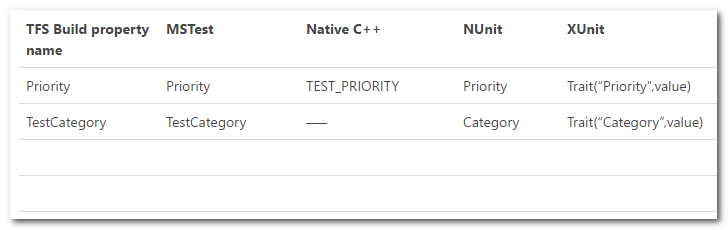
I initially couldn't get the category filtering to work. The documentation noted in the References said that an xUnit trait of "Category" would be automatically matched to the test explorer's "TestCategory".
2017-02-02_112605

But, that's not true. xUnit (and presumably Nunit and others) passes its traits directly. See this exchange on the subject (Brad Wilson developed xUnit).

https://github.com/xunit/xunit/issues/1052

If you use this attribute in xUnit:

[Trait("Category", "manual")]

and this filter:

TestCategory!=manual

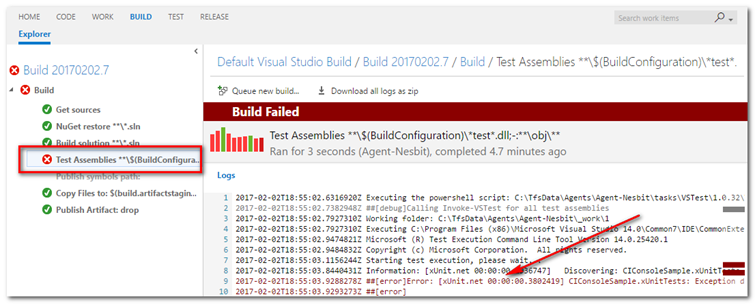
the tests will fail. The MS test console will report an error, not run the test as expected. To find the error, you need to look in the build's logs.
2017-02-02_120035

Here's the error message. It's the same message you'd get if you used the command line to run the tests (which is how I first discovered the error).

2017-02-02T18:55:03.9288278Z ##[error]Error: [xUnit.net 00:00:00.3802419]
CIConsoleSample.xUnitTests: Exception discovering tests: No tests matched the filter 
because it contains one or more properties that are not valid (TestCategory). Specify
filter expression containing valid properties (Category, DisplayName, FullyQualifiedName)
and try again.

"Well, OK," I thought, "I'll just add 'Category' into the filter."

TestCategory!=manual | Category!=manual

Now I get two errors:

Error: No tests matched the filter because it contains one or more properties that 
are not valid (Category). Specify filter expression containing valid properties 
(TestCategory, Priority, FullyQualifiedName, Name) and try again.

Information: [xUnit.net 00:00:00.3791321]   Discovering: CIConsoleSample.xUnitTests

Error: [xUnit.net 00:00:00.4843279] CIConsoleSample.xUnitTests: Exception discovering
tests: No tests matched the filter because it contains one or more properties that 
are not valid (TestCategory). Specify filter expression containing valid properties
(Category, DisplayName, FullyQualifiedName) and try again.

Maybe I need to use a Boolean AND in the filter.

TestCategory!=manual & Category!=manual

Nope, I get the exact same error message. After further testing and research, I learned that if there's a filter, at least one test in the assembly must satisfy the filter. In other words, if you filter on TestCategory, at least one test must include that trait, regardless of whether it's needed.

In my case, I'm using a single Visual Studio Test build step to run tests using two frameworks. When I was using [TestCategory("manual")] for MSTest, and [Trait("Category","manual")] for xUnit, and a filter of TestCategory!=manual | Category!=manual, here's what happened.

  1. The MSTest framework was called. The filter was evaluated and no tests with a trait of "Category" were found. So an error was reported.
  2. The xUnit framework was called. The filter was evaluated and no tests with a trait of "TestCategory" were found. So an error was reported.

The first time I ran the tests, I only had a filter TestCategory!=manual. The MSTests succeeded because there was, indeed, a trait with that name.

I did try some other filtering, hoping that filters might evaluate conditions in a "short-circuit" way, but always got the same errors. For example, I tried this:

(FullyQualifiedName~MSTest && TestCategory!=manual) || (FullyQuallifiedName~xUnit && Category!=manual)

This as a problem for reusing build definitions. It would be better if invalid traits were simply ignored, and the tests get run. This is a known problem, as Brad Wilson notes at the end of this thread.

https://github.com/xunit/xunit/issues/610

bradwilson commented on Oct 18, 2016 Unfortunately, this exception is generated by Visual Studio, not by us. We provide the list of traits to them, and they do the filtering; they're the ones generating this message. When you Google for the phrase "No tests matched the filter because it contains one or more properties that are not valid" you'll see hits for all testing frameworks, not just xUnit.net.>

The only workaround is to always include the trait on at least one test in the assembly. Note the trait doesn't need a used value.

    [Fact]
    [Trait("Category","blamo")]
    public void SaveGreetingToCloud()

So, that's not ideal, but it's up to Microsoft to take care of the problem.

Can we mitigate the issue at all? Sort of. We can at least have better management of our trait filters for different test frameworks.

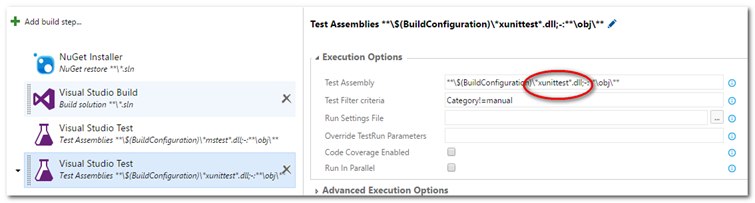
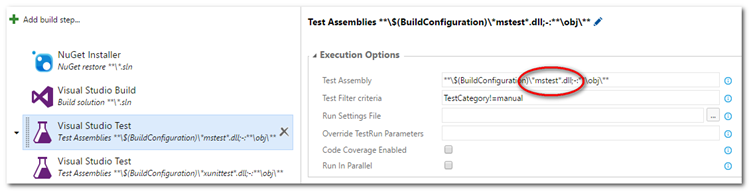
First, let's grant that this is an unusual situation, using multiple test frameworks. The better way to manage this would probably be to have two test runs, one for MSTest and the other for xUnit. Add another build step to our definition, and then to change the Test Assembly fields to search for specifically. In other words, we'd have one build step for MSTest, and one for xUnit, and then we could name the traits as desired. This would rely on developers sticking to some naming conventions.

Warning
Be sure to evaluate your test results when you change settings and look for sane expectations. For example, when I first tried my xUnit build step, I added an extra "l" to .dll. The build didn't fail, it just didn't find any xUnit tests! I needed to look at the log and check that it had found the tests I expected.

MSTest step
2017-02-02_125322

xUnit step
2017-02-02_125431

Now, when running the automated build, there are two test runs, each with its own filter.

Next Part: TFS Continuous Integration Walk Through Part 5 - Multiple Solutions in Team Project
TFS Continuous Integration Walk Through Part 4a - Filtering Tests

ci-logoThis is part of a series of walk throughs exploring CI in TFS, starting from the ground up. The entire series and source code are maintained at this BitBucket repository.
https://bitbucket.org/bladewolf55/tfs-ci-samples

Previous Part: TFS Continuous Integration Walk Through Part 3 - Notifications

References
Test: Visual Studio Test
Part 2: Using Traits with different test frameworks
Part 3: Unit testing with Traits and filtering... <-Note that the documentation on mapping "Category" is wrong, see below!
Running selective unit tests in VS 2012 RC using TestCaseFilter
VSTS/TFS Visual Studio Test Task - Filter Criteria
Running unit tests with Test Explorer: Group and Filter
How to: Group and Run Automated Tests Using Test Categories
Run Tests using Visual Studio task

In some environments, not all unit tests should be run on the CI server. For example, there might be tests with external dependencies that are expensive to run, such as a fee for verifying data was saved to an external cloud-based site. Or legacy tests that require manual setup or interaction. Or, the most likely, a test that takes a very long time to run. While these should probably be refactored or replaced, the fact is sometimes we don't want all our tests running automatically.

One way to restrict tests running is to use the "Test filter criteria" setting. A simple example is using test categories to isolate the manual tests. "TestCategory", "Priority", "Name", etc are all generically referred to as traits.

Before showing the example, there are two rules for using traits with the Microsoft test console, which is the executable that runs tests regardless of framework.

Test Filter Criteria Rule
If you set test filter criteria, at least one of your unit tests in every assembly must match that criteria. Otherwise, an error will occur.

In practice, this means that if your filter is looking for TestCategory=weekly, any project that uses the build definition, and has tests, must have at least one test with a trait named "TestCategory". (For more detail, see Part 4b - Problems With Traits.)

This will make more sense as you go through the code below.

Add the following class to Program.cs. This is simulating a cloud-based retrieval of a greeting. For some fictitious reason, it's very expensive to do this.

    public class CloudMan
    {
        //This takes ten minutes to run!
        public string GetLastGreeting()
        {
            //Set up connection, pass credentials, etc.
            return "";
        }
    }

Add the following test methods:

MSTest

            [TestMethod]
            [TestCategory("manual")]
            public void SaveGreetingToCloud()
            {
                //arrange
                string value = "Cloud Atlas";
                string expectedResult = "Hello, Charles";
                TextMan textMan = new TextMan();
                CloudMan cloudMan = new CloudMan();
                //act
                string actualResult = textMan.Greeter(value);
                //assert
                Assert.AreEqual(expectedResult, cloudMan.GetLastGreeting());
            }

xUnit

            [Fact]
            [Trait("TestCategory", "manual")]
            public void SaveGreetingToCloud()
            {
                //arrange
                string value = "Cloud Atlas";
                string expectedResult = "Hello, Charles";
                TextMan textMan = new TextMan();
                CloudMan cloudMan = new CloudMan();
                //act
                string actualResult = textMan.Greeter(value);
                //assert
                Assert.Equal(expectedResult, cloudMan.GetLastGreeting());
            }

MSTest uses a TestCategory attribute for categories. xUnit uses its Trait attribute to set a "TestCategory" trait (traits are also the way to set "Priority").

Note You must set the xUnit trait name to TestCategory in this example, or the test won't be discovered. See Part 4b - Problems With Traits for more information.

If you run the tests locally right now, the new tests will still fail because the category is ignored. Likewise, if you check in the code, the tests will fail on the CI server because there's no filter, yet.

Applying the Filters

It's possible to filter tests locally. One way is from the command line.

https://msdn.microsoft.com/en-us/library/dd286683.aspx

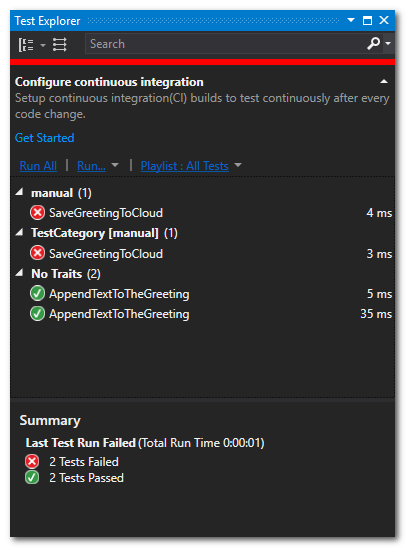
But you can also group by traits in the Text Explorer, and selectively run the tests. (This doesn't work so well if you're using multiple test frameworks).

2017-02-02_102530

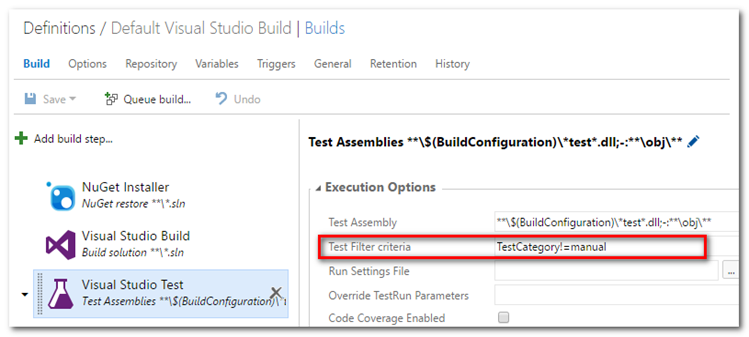
We want our CI server to only run the non-manual tests. Let's apply the filter in TFS Build. Edit the build definition as shown above, and select the Visual Studio Test step. Add the "Test Filter criteria" TestCategory!=manual and Save.

2017-02-02_103011

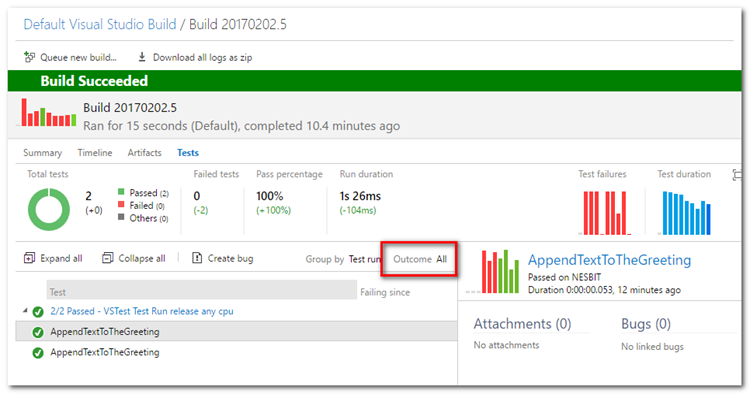
Click "Queue build" to rerun the build. If you haven't checked in the code with the test categories, do that instead. The result should be just two tests run, and both pass. Here are the Test Results detailed report. Be sure to change the Outcome to show all the tests.

2017-02-02_112051

Next Part: TFS Continuous Integration Walk Through Part 4b - Problems With Traits

TFS Continuous Integration Walk Through Part 3 - Notifications

ci-logoThis is part of a series of walk throughs exploring CI in TFS, starting from the ground up. The entire series and source code are maintained at this BitBucket repository.
https://bitbucket.org/bladewolf55/tfs-ci-samples

Previous Part: TFS Continuous Integration Walk Through Part 2 - Create an Automated Build

That's great, right? It worked. But it's not going to help me if I don't know the build failed, and I'm not going to keep a TFS page open, watching it like a hawk. I want email alerts.

Note There used to be another option for notifications: the Build Notification application. It would show build failure notifications in the status tray. But that only works for XAML builds. There appears to be a third party utility that does the same thing for the modern builds: CatLight.

Configure SMTP for Email

References
Configure an SMTP server and customize email for alerts and feedback requests in TFS
TFS Email via Gmail Account <- He enables POP3, but you don't have to.

These steps assume you have administrative access to the administration console.

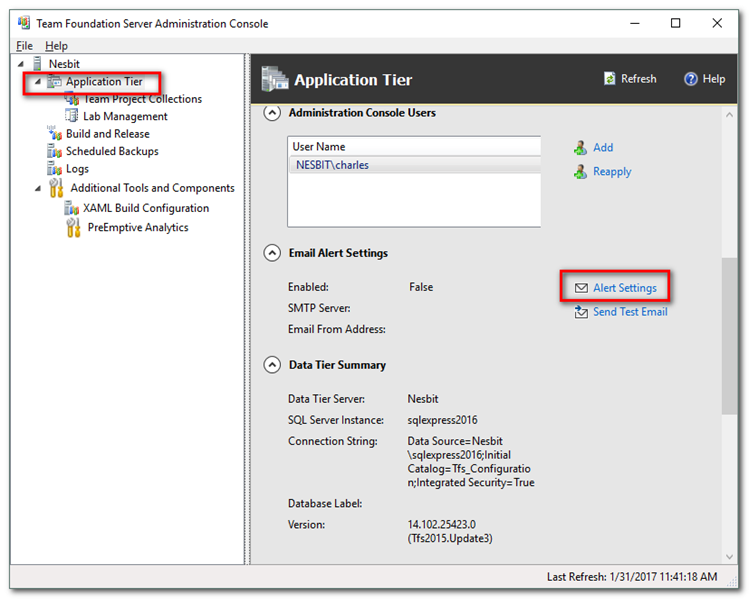
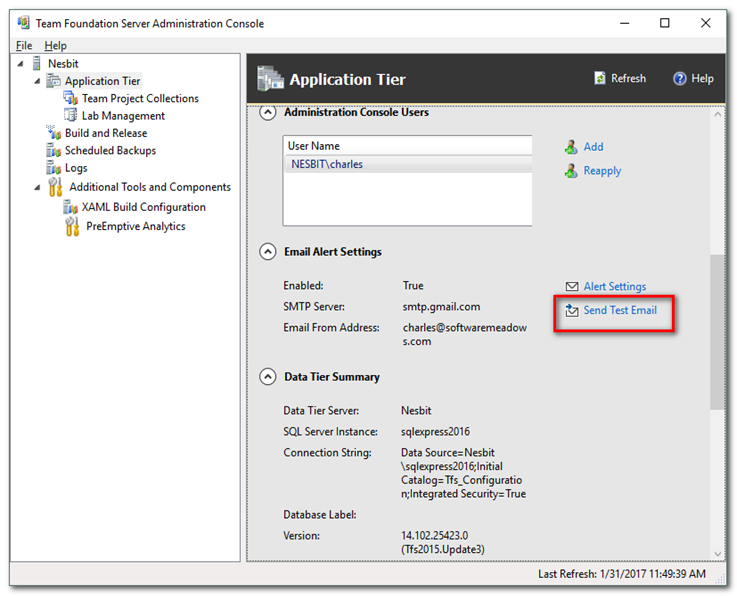
Open the Team Foundation Server Administration Console, select Application Tier, scroll down to and open Alert Settings.

2017-01-31_114324

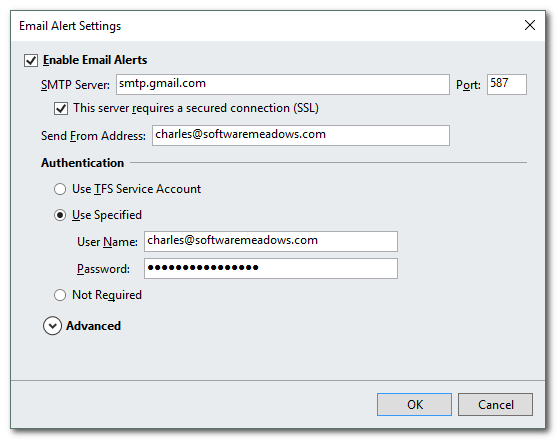
In the Settings window, check Enable Email Alerts and configure your SMTP server settings. In my case, I used my Gmail account for testing.

Note There are challenges getting Gmail SMTP to work in TFS that are beyond the scope of this article. That means, it would take too much space to document it all.

2017-01-31_114911

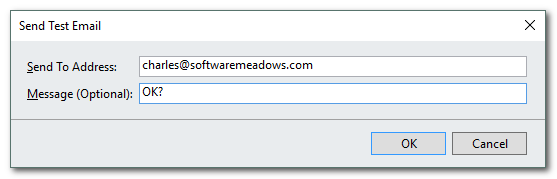
Send a test email.

2017-01-31_115054
2017-01-31_115205

Configure TFS Alerts

References
Receive build notifications

Alerts are configured per team project. You can create project alerts from the Team Explorer > Settings, but below I show how to do it from the web site.

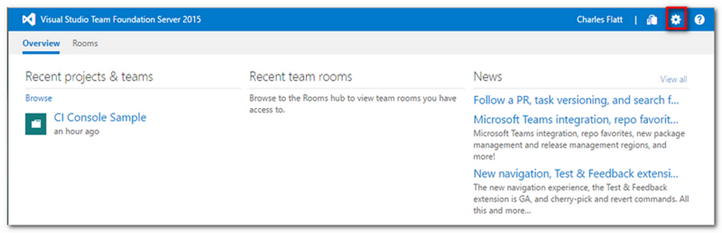
Open the main TFS page and click the Settings gear icon.

2017-01-31_123851

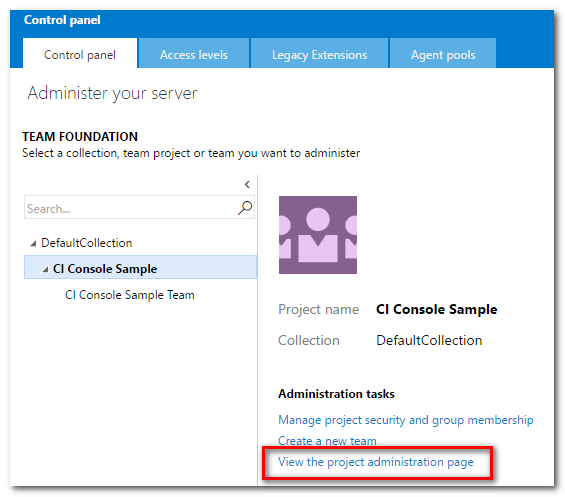
Select the CI Console Sample project. Click "View the project administration page"

2017-01-31_124017

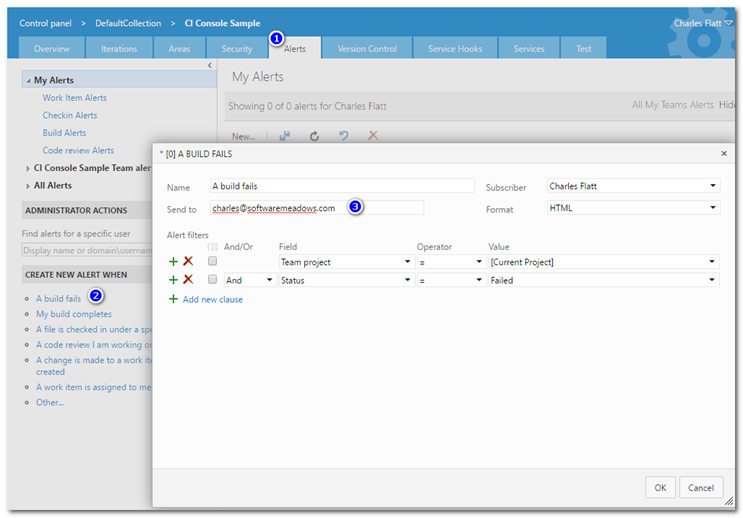
Open the Alerts tab. Click the link under Create New Alert When... "A build fails". In the dialog, enter the Send To email address and click OK.

2017-01-31_124245

Configure Team TFS Alerts

Here's a simple configuration for build notifications. It assumes

  • Not everyone on the team should be notified of build failures.
  • There are two developers on the team who should receive notifications if any build fails.

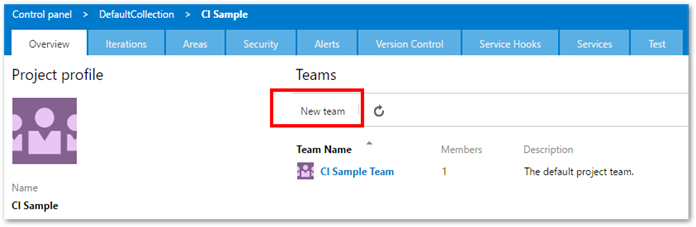
Open the Overview tab in the Control panel. Click "New team".

2017-03-07_120812

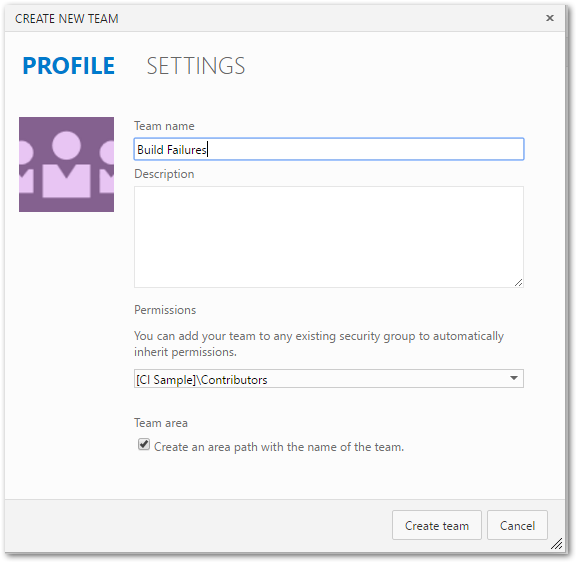
Name the team something like "Build Failures". In the Permissions, leave as Contributers. Click Create Team.

Option
You could also allow anyone on the team to be a Build Admin by choosing that group.

2017-03-07_121236

Edit the team and add any desired team members.

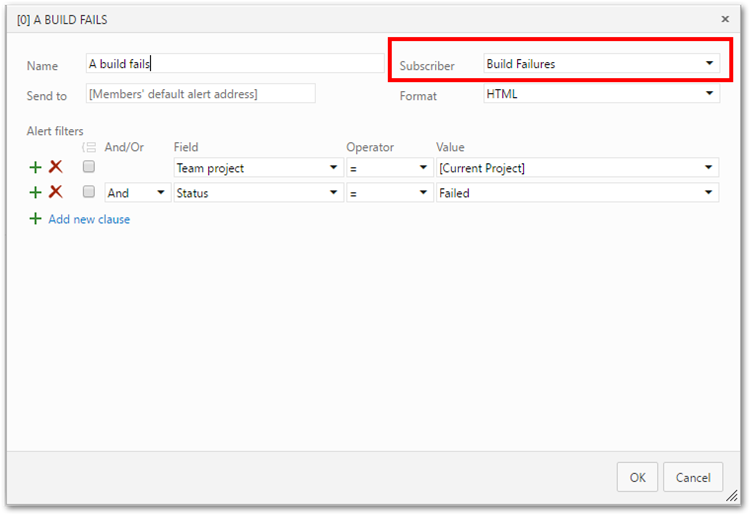
Open the Alerts tab. Click the link under Create New Alert When... "A build fails". Rename as desired. The only difference from a personal alert is the Subscriber. In this case, "Build Failures" is the team who will receive the alert. Click OK.

2017-03-07_121630

Test Notification

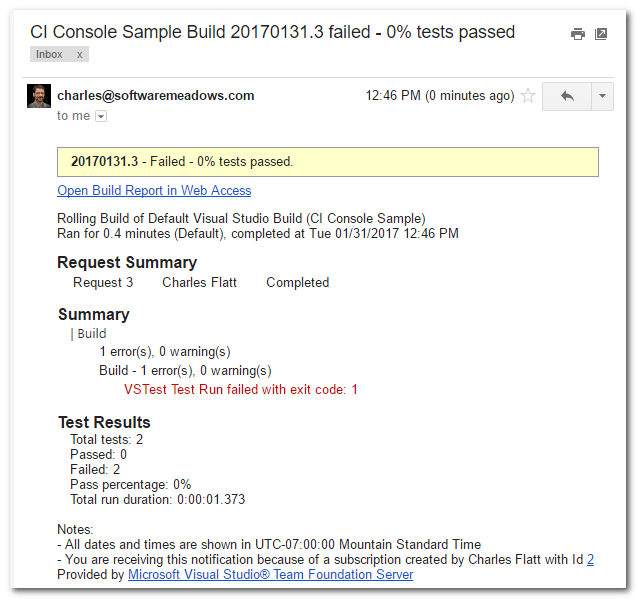
Make a change of some kind to the source code (but that doesn't pass the tests!) and check in your changes. That will start a build. When the build fails, you should get an email.

2017-01-31_124659

Test Success

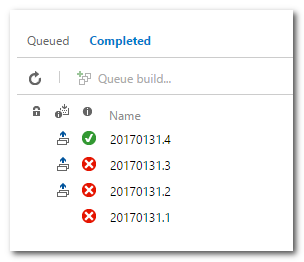
Let's finally get our test passing. Update the Greeting code, confirm the tests pass locally, then check in. You should not get an email alert, and you should see a successful build.

    public class TextMan
    {
        public string Greeter(string value)
        {
            return "Hello, " + value;
        }
    }

2017-01-31_125046

Next Part: TFS Continuous Integration Walk Through Part 4a - Filtering Tests